
The announced end of Microsoft Project Online marks a significant turning point for many organizations. It creates a clear imperative: find a tool that can replace MS Project while ensuring operational continuity, cross-functional governance, and multi-project management.
However, this replacement is not just about switching interfaces. It directly impacts business processes, decision-making, and teams' ability to collaborate effectively. In reality, choosing a tool means choosing a management model. In this context, a key question arises: which tool truly offers the same functional coverage as Microsoft Project?
Not all tools are equal. A large part of the market now offers modern, collaborative, and attractive solutions. Yet many of them are not designed to replace MS Project, but to serve different use cases.
This is precisely where confusion lies and what needs to be clarified:
A “false replacement” is a tool that improves user experience or collaboration but does not cover the fundamentals of planning: dependency management, resource management, cost tracking, and multi-project consolidation. It may suit teams or simple projects, but as complexity increases, it introduces limitations.
Conversely, a “true replacement” can cover these fundamentals without regressing. It preserves the rigor of MS Project-style management while adapting to modern challenges: cross-functionality, collaboration, and global visibility.
This topic is even more critical given that Microsoft Project itself shows limitations in modern organizations. Originally designed as a planning tool for project managers, it remains poorly suited to multi-team environments, cross-functional decision-making, and real-time collaboration needs. Its enterprise-wide deployment is often complex, and adoption is uneven. The challenges are therefore twofold: ensuring operational continuity without losing control… while modernizing practices to meet current organizational demands.
In this article, we aim to clarify this landscape:
A realistic analysis of Microsoft Project in the context of modern organizations
What are the “true” and “false” replacements for Microsoft Project?
Objective comparison criteria to guide your decision
To do so, we will rely on a detailed analysis of key features to assess the true ability of leading market tools to replace MS Project.
Microsoft Project in Modern Organizations
Let’s start by analyzing Microsoft Project. This tool is widely used in enterprises because it offers:
Detailed planning of individual projects, with Gantt charts, dependencies, and critical path analysis.
Resource management, including allocation and leveling for a project.
Cost and budget tracking at the project level, with standard reporting.
History and baselines to measure gaps between planned and actual performance.
These capabilities make it an essential tool for project managers and leaders, but they also reveal maturity limitations for more complex organizations:
Limited cross-functional collaboration: Teams cannot work simultaneously on the same project plan without relying on external tools (Teams, SharePoint). Communication and real-time updates across departments remain cumbersome.
Complex multi-project management: Although multiple projects can coexist, MS Project lacks a simple native consolidation feature. Portfolio views, inter-project dependencies, and global prioritization often require exports or manual processing.
Limited cloud integration outside Microsoft: The tool is tightly tied to the Microsoft ecosystem. Integrations with ERP, CRM, or advanced reporting tools typically require additional development.
Insufficient cross-functional governance: Control mechanisms and workflows remain focused on individual projects. It is difficult to standardize processes and approvals across the enterprise.
In summary, Microsoft Project excels at planning and tracking projects individually but does not seamlessly support cross-project coordination, multi-team collaboration, or integration within a heterogeneous IT environment. These limitations create a clear need: to find a tool that can replace Microsoft Project while ensuring operational continuity and modernizing practices without disrupting existing processes. On one hand, organizations must preserve their ability to plan, manage, and secure projects without disruption or loss of control. Any functional regression can directly impact timelines, costs, or team coordination. On the other hand, this transition represents an opportunity to address structural limitations: improving collaboration between teams, increasing cross-functional visibility, and simplifying governance processes. The challenge, therefore, is not only to replace MS Project but to do so without weakening the existing setup while enabling the organization to operate in a more fluid, connected, and scalable way.
How to Choose a Replacement Without Compromising What Already Exists
Faced with this delicate balance between continuity and modernization, choosing a tool cannot be reduced to a superficial comparison of features or marketing promises. It requires a precise assessment of actual functional coverage, particularly regarding the core capabilities inherited from Microsoft Project: planning, dependencies, resources, costs, and multi-project management.
With this in mind, we built the comparison below to identify which tools can truly replace MS Project without regression, while also highlighting solutions that go further in supporting organizations with cross-functional challenges.
For this comparison, we selected Planisware Orchestra, Jira, Wrike, Smartsheet, ClickUp, and Monday.com, as they represent the main alternatives seriously considered by companies when replacing Microsoft Project, each with a complementary market positioning.
Planisware Orchestra : chosen as a benchmark for advanced functional replacement, capable of covering MS Project fundamentals (planning, resources, costs) while providing a cross-functional and collaborative approach suited to complex organizations.
Jira : already widely used in IT and product teams, often seen as a natural internal alternative, although more focused on task management and workflows than structured planning.
Wrike : a mature collaborative solution positioned between project management and team coordination, with advanced reporting and automation capabilities.
Smartsheet : often perceived as a “modernized Excel,” widely used to structure projects with a table + Gantt approach, making it a frequent candidate for replacing MS Project.
ClickUp : a fast-growing tool, valued for its flexibility and ability to centralize multiple use cases (tasks, documents, dashboards), often chosen to replace several tools at once.
Monday.com : a widely adopted collaborative platform, easy to deploy and accessible, frequently selected to modernize project management practices.
Together, these tools represent the main categories of options available on the market to address modern needs: structured functional replacement of existing systems, the addition of collaborative capabilities, and hybrid tools combining project and task management.
But how can you determine which tool best fits your organization? We will now introduce an objective evaluation method to support your selection process.
Evaluation of Microsoft Project Alternatives
We adopted a factual and rigorous approach. Each tool is evaluated against a strict functional benchmark built from official Microsoft documentation, including Project Online, Project for the web, and user and administrator guides.
To make this analysis objective, we assigned a score to each tool based on Microsoft Project’s key features to assess their real ability to replace it without regression, using a functional scoring system out of 40 points. The points were distributed according to the following criteria:
0 = Feature not covered by the tool
0,5 = Workaround solution
1 = Partial coverage
1,5 = Coverage with limitations
2 = Equivalent coverage to Microsoft Project
2,5 = Exceeds Microsoft Project capabilities
The table below summarizes a complete comparison matrix available for download here. The 16 features presented were analyzed for each tool and compared using the following structure:
What the tool does similarly to MS Project
The tool’s strengths compared to MS Project
The tool’s weaknesses compared to MS Project
Conclusion and overall assessment of its ability to replace MS Project
| CRITERIA | MSP | Planisware Orchestra | Jira | Wrike | Smartsheet | ClickUp | Monday.com |
|---|---|---|---|---|---|---|---|
| ADVANCED GANTT | 2 | 2,5 | 0 | 1,5 | 1,5 | 1 | 0,5 |
| CRITICAL PATH | 2 | 2 | 0 | 1 | 1 | 0,5 | 0 |
| BASELINES | 2 | 2,5 | 0 | 1 | 1 | 0,5 | 0 |
| SCHEDULE DEVIATIONS | 2 | 2 | 0 | 1 | 1 | 0,5 | 0 |
| MULTI-PROJECT MANAGEMENT | 2 | 2,5 | 1 | 1,5 | 1,5 | 1 | 0,5 |
| REAL-TIME COLLABORATION | 1 | 2 | 2 | 2 | 2 | 2 | 2,5 |
| RESOURCE ALLOCATION | 2 | 2 | 1 | 1,5 | 1 | 1 | 0,5 |
| RESOURCE LEVELING | 2 | 2,5 | 0 | 0,5 | 0,5 | 0 | 0 |
| WORKLOAD MANAGEMENT | 2 | 2,5 | 1 | 1,5 | 1 | 1 | 0,5 |
| PROJECT REPORTING | 2 | 2,5 | 1,5 | 1,5 | 1,5 | 1 | 1 |
| MULTI-PROJECT REPORTING | 2 | 2,5 | 1 | 1,5 | 1,5 | 1 | 0,5 |
| WORKFLOWS / CONTROLS | 1 | 2 | 2,5 | 2,5 | 2 | 2 | 2,5 |
| SECURITY & ROLES | 1,5 | 2 | 2,5 | 2 | 2 | 2 | 2 |
| COST & BUDGET MANAGEMENT | 2 | 2,5 | 0 | 2,5 | 1,5 | 0,5 | 1 |
| APIs / CONNECTORS | 1,5 | 2 | 2,5 | 2 | 2 | 2 | 2 |
| ENTERPRISE-SCALE DEPLOYMENT | 2 | 2 | 2 | 2 | 2 | 1,5 | 1,5 |
| TOTAL SCORE | 27/40 | 33 ,5/40 | 16/40 | 24/40 | 22/40 | 16,5/40 | 14,5/40 |
The results of this scoring are presented visually in the diagram below:
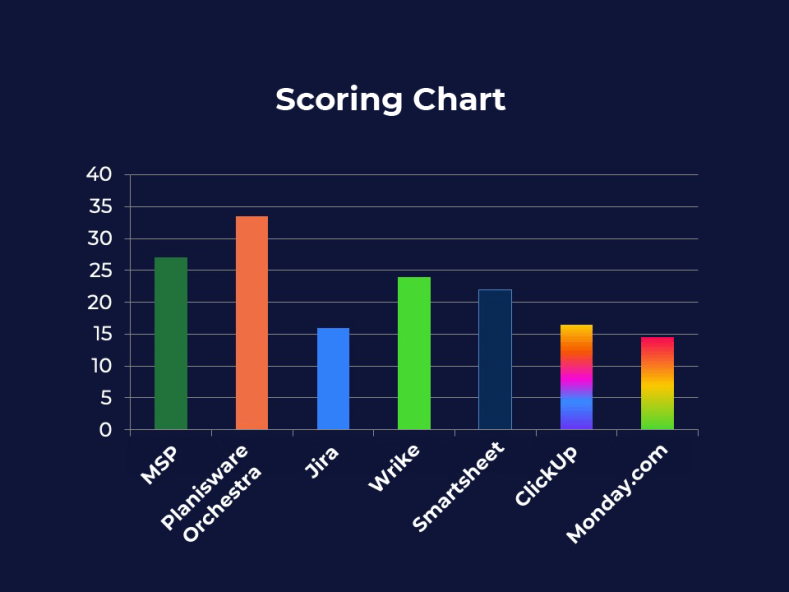
Evaluation of Microsoft Project Alternatives
Microsoft Project: Historical Planning Reference
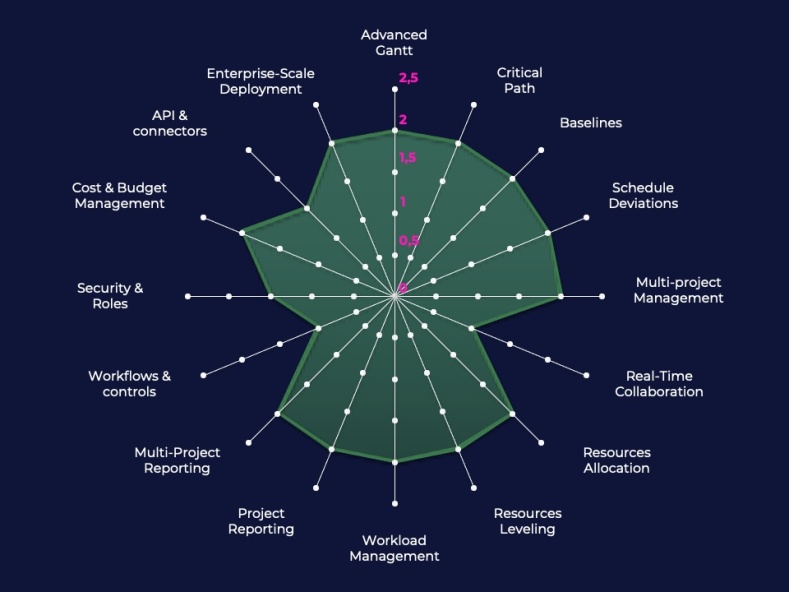
MS Project remains the benchmark for structured project planning. The tool excels at managing complex schedules, with advanced Gantt charts, critical path calculation, baselines, resource management, and integrated budget tracking. It enables structuring complex projects into tasks, allocating resources, and precisely tracking costs and timelines.
However, MSP was originally designed as a planning tool for project managers, not as a collaborative platform. Desktop versions have historically limited real-time collaboration, and the broader Microsoft ecosystem (Project Online, Server, Power BI) is often required to achieve cross-functional and collaborative visibility.
Summary:
A reference for advanced planning.
Extremely powerful when it comes to resources, costs, and dependencies.
Collaboration and adoption difficult in modern environments.
Planisware Orchestra: MSP Coverage + Cross-functional Management
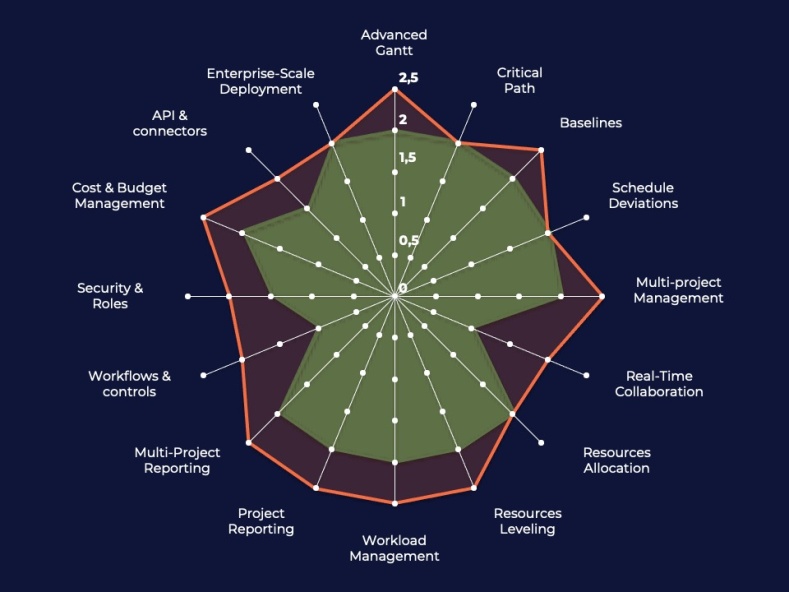
Planisware Orchestra covers the core features of MSP: advanced Gantt, dependencies, resource management, variance tracking, and budget control.
Where Orchestra goes further is in cross-functional coordination at the organizational level. Projects are no longer isolated: resources, budgets, and dependencies can be analysed globally, enabling organizations to prioritize and balance multiple initiatives simultaneously.
The tool combines MSP-equivalent project planning, native multi-project consolidation, modern collaboration, and true organizational visibility.
Summary:
Replaces MSP without functional loss.
Adds organizational and collaborative capabilities.
Particularly suited for companies managing many interdependent projects.
Jira: A Powerful Platform Oriented Toward Development
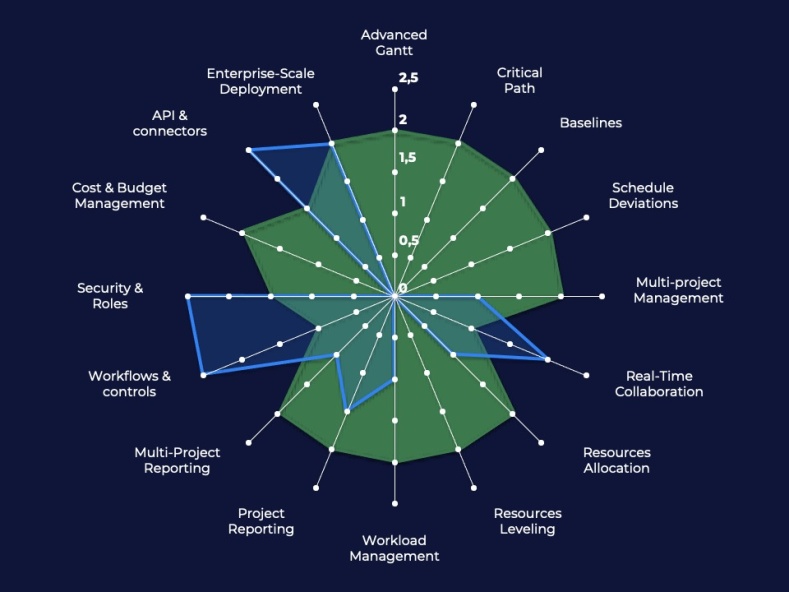
Jira was originally designed as an issue-tracking and software development tool, widely used in agile environments. Its workflow system, permissions, and APIs are highly robust and extensible.
However, Jira is not a traditional project planning tool. Features such as critical path, baselines, or resource levelling are limited or non-existent without extensions.
Summary:
Very powerful for workflows and technical ecosystems.
Well-suited for product or IT teams.
Less suitable as a replacement for MSP in complex planned projects.
Wrike: Structured and Collaborative Project Management
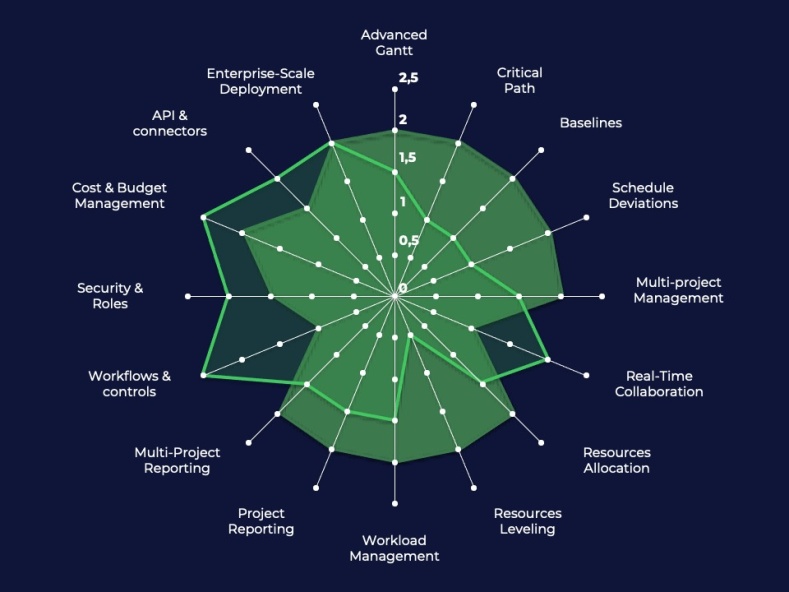
Wrike is a collaborative platform designed to manage structured projects with solid planning capabilities. It offers Gantt charts and dependencies, resource management, reporting, automation, and real-time collaboration. It is often used by marketing teams, agencies, and organizations that require structured workflows.
Some analyses show it is well-suited for environments requiring detailed tracking and complex workflows. However, advanced planning capabilities (multiple baselines, automatic levelling, budget simulation) remain more limited than in MSP.
Summary:
Good balance between planning and collaboration.
Can partially replace MSP.
Limited to highly complex projects.
Smartsheet: Flexible Project Management Based on a Spreadsheet Model
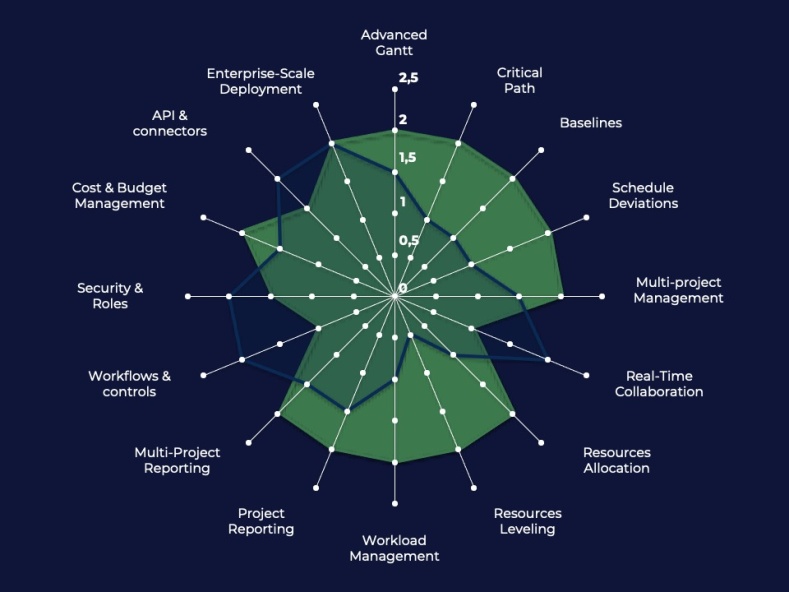
Smartsheet stands out for its spreadsheet-like approach, making it easy for teams familiar with Excel to adopt.
It supports task and dependency tracking, budget management, reporting, consolidated dashboards, and automation. This approach offers strong flexibility for modelling projects and tracking data. However, advanced planning capabilities are less structured than in MSP.
Summary:
Very flexible and accessible.
Strong project data consolidation.
Less robust for advanced planning.
ClickUp: Highly Customizable Work Management Platform
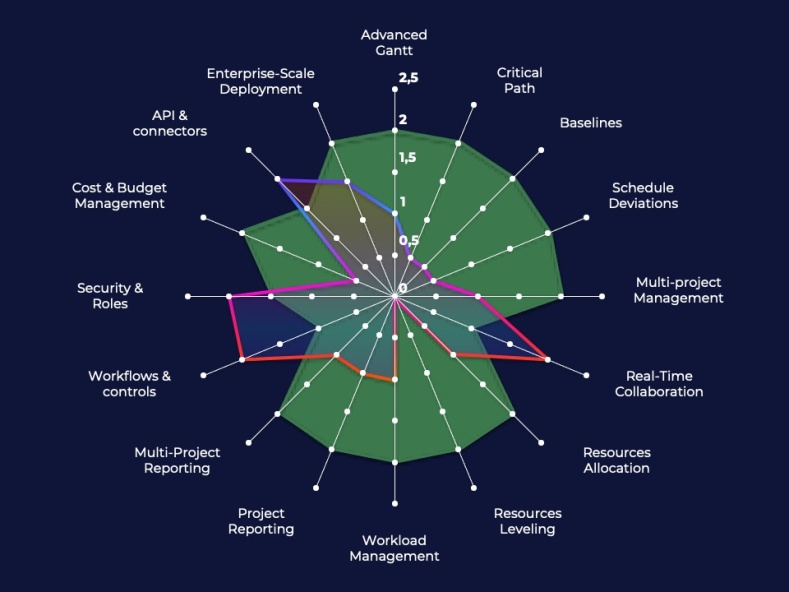
ClickUp is a modern work management platform combining task management, collaboration, and automation. It offers high customization and multiple views (list, Kanban, timeline).
The tool is highly valued for its flexibility and collaboration capabilities. However, advanced planning, resource management, and financial control are less developed than in MSP.
Summary:
Very flexible and modern.
Excellent for task management and collaboration.
Limited as an MSP replacement for complex planning.
Monday.com: A Team-Oriented Collaborative Platform
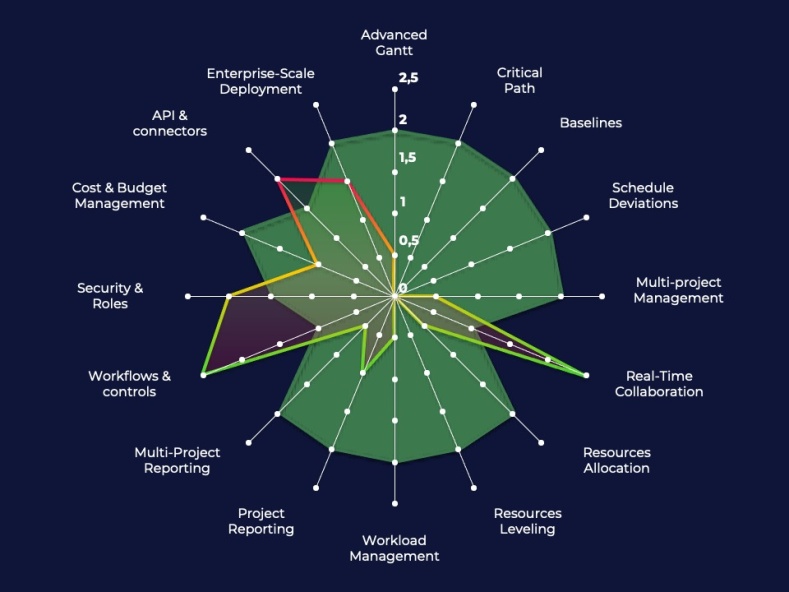
Monday.com is a highly intuitive collaborative platform focused on team coordination and project visualization. It offers dashboards, automation, and integrations with many tools.
It excels in real-time collaboration, project visualization, and rapid team adoption. However, its advanced planning capabilities remain limited compared to MSP.
Summary:
Very easy to adopt and highly collaborative.
Ideal for operational team management.
Not well-suited to replace MSP for complex projects.
Choose the right MSP replacement for your situation
Given the wide range of project management tools available on the market, it is essential not to think in terms of the “best tool,” but rather to focus on the best fit for your organization. Each solution addresses specific needs: some tools excel in detailed planning and structured management, while others prioritize collaboration, flexibility, or agility.
This table provides a clear view of each tool's use cases, highlighting when to choose them and, just as importantly, when to avoid them. The objective is to help you align your choice with your project maturity level, operational constraints, and business priorities.
| TOOLS | When to Choose It | When NOT to Choose It |
|---|---|---|
| Planisware Orchestra |
|
|
| Jira |
|
|
| Wrike |
|
|
| Smartsheet |
|
|
| ClickUp |
|
|
| Monday.com |
|
|
Three Categories of Replacements
The analysis of the scoring table highlights three main categories of tools, each corresponding to very different organizational choices. Each comes with benefits, but also trade-offs that must be anticipated.
1. Full Functional Replacements
Full functional replacements are the only category capable of ensuring a seamless transition for organizations heavily structured around Microsoft Project. These tools replicate the core capabilities that define MSP’s value: detailed dependency modeling, advanced resource management, cost tracking, multi-project management, and the ability to structure complex schedules.
They therefore allow organizations to maintain a high level of operational control, particularly in environments where projects are interdependent, constrained, and subject to frequent prioritization decisions.
Beyond this continuity, these solutions bring a significant evolution: they extend these capabilities into a more cross-functional and collaborative dimension, with centralized data, improved global visibility, and real-time interactions between teams. While MSP has historically been centered on the project manager and file-based workflows, these tools introduce a more integrated approach, enabling organization-wide management without sacrificing planning rigor.
However, this positioning also comes with a certain level of complexity. Their functional richness requires strong initial structuring, proper data governance, and support for change management to ensure adoption. Unlike lighter tools, they do not simplify project management; they make it more robust and scalable.
As such, they are primarily suited for organizations that cannot afford to lose precision and that view the replacement of MS Project not as a simplification but as an opportunity to strengthen their management capabilities.
2. Hybrid Tools, Between Planning and Collaboration
Hybrid tools occupy a middle ground that appeals to many organizations: they provide enough planning capabilities to structure projects while natively integrating modern collaboration features. Simplified Gantt charts, basic dependency management, consolidated views, and dynamic dashboards address part of Microsoft Project’s use cases but do not match its full depth.
This positioning delivers immediate benefits in terms of adoption. Interfaces are more intuitive, teams can collaborate in real time, and project management becomes accessible to non-expert users. These tools facilitate day-to-day coordination, improve visibility, and reduce reliance on files or heavy processes.
However, this simplification comes with structural trade-offs. Dependency management is less granular, resource management is often limited, and analytical capabilities (simulation, prioritization, complex consolidation) are reduced. In simple or moderately complex environments, this remains acceptable. But as soon as projects become highly interdependent or require rigorous planning, these limitations quickly emerge.
The main risk lies in the gap between actual management needs and the tool’s capabilities. Teams may end up recreating processes outside the platform (E.g., in Excel or through parallel reporting), weakening overall consistency.
In summary, hybrid tools represent a solid compromise for organizations looking to modernize their practices, provided they accept a partial loss of precision and control compared to Microsoft Project.
3. Collaboration / Task Management Platforms
Collaboration and task management platforms sit at the opposite end of the spectrum from Microsoft Project. Their goal is not to structure complex planning, but to streamline execution, communication, and team coordination. They are built on simple principles: tasks, statuses, workflows, notifications, and real-time collaboration. This approach makes them particularly effective in dynamic, agile, or product-oriented environments.
Their main advantage lies in adoption. Interfaces are intuitive, teams can quickly get up to speed, and information flow is significantly improved. Visibility into ongoing work is immediate, and collaboration becomes natural, without relying on additional tools.
However, this simplicity comes at the expense of structure. Advanced planning capabilities are limited: complex dependency management, critical path calculation, resource management, and budget tracking are either absent or highly simplified. The tool no longer enables precise project modelling; instead, it supports execution tracking as work progresses.
This shift has important implications. Management becomes more operational than predictive, and the ability to anticipate risks or prioritize across multiple projects is reduced. In simple organizations, this may be sufficient. But in more complex environments, it can lead to a gradual loss of control, often compensated by parallel tools or informal processes.
Ultimately, these platforms are not functional replacements for Microsoft Project. They represent a shift in model: from structured planning to collaborative execution. This choice can be relevant, but it must be made consciously, with a clear understanding of its impact on overall project governance.
How to Make the Right Decision
At this stage, the choice no longer depends solely on tool features, but on your organization’s operational reality. Three key questions should guide the decision:
What is your level of project complexity? If your projects are interdependent, with shared resources and strong constraints, an advanced planning tool remains essential. Conversely, if your projects are autonomous and lightly constrained, simpler tools may be sufficient.
What level of control do you want to maintain? Some organizations prioritize rigor, predictability, and cost control. Others accept more flexibility in favor of speed and collaboration.
What is your real objective: replace or transform? Replacing MS Project means retaining its capabilities without regression. Transforming ways of working means accepting trade-offs in exchange for new benefits.
This benchmark highlights a simple reality:
All tools can replace part of Microsoft Project
Very few can replace it entirely
Some are not designed for this purpose
The right choice depends less on the tool itself than on your level of management requirements. In most replacement projects, challenges do not come from the tool, but from poor initial framing. The most common mistakes include:
Confusing collaboration with management: a collaborative tool does not replace structured planning capabilities
Underestimating actual project complexity: what works for a simple project does not necessarily scale
Choosing a tool based solely on usability: at the expense of critical capabilities
Shifting organizational decisions onto the tool: no tool can compensate for a lack of governance
Conclusion
Replacing Microsoft Project is not just a technical decision, it is a structural decision for the organization.
Choosing a tool that is too simple risks losing control
Choosing a tool that is too complex risks user rejection
Choosing the right tool means finding the balance between continuity and evolution
In all cases, one thing is certain: replacing MSP is an opportunity, provided it is actively managed rather than passively endured.